MusicallyDown.com: What Happened to This TikTok Downloader?
From watermark-free TikTok downloads to a domain dispute, here is what the service offered, how its tools work, and what users should know in 2026.

Last Updated on October 9, 2026 by Fame Katha Editorial Team
MusicallyDown.com became known as a website for downloading TikTok videos without watermarks. Its main idea was simple. Copy a TikTok link, paste it into a downloader, and save the video.
No complicated editing was needed.
But there is an interesting story behind this website. The original domain was involved in a trademark dispute with ByteDance, TikTok’s parent company, in 2021.
The original MusicallyDown.com domain could not be accessed during research on October 9, 2026. A different domain, MusicalDown.com, still displays a MusicallyDown-branded downloader.
The spelling difference matters. Both addresses should not be treated as the same verified business.
Quick Facts
| Detail | Information |
|---|---|
| Website name | MusicallyDown |
| Original domain | musicallydown.com |
| Website type | TikTok video downloader |
| Original domain registered | September 23, 2018 |
| Main historical service | Download TikTok videos without watermarks |
| Video format advertised | MP4 |
| Audio format advertised | MP3 |
| Original domain dispute | ByteDance Ltd. v. domain registrant |
| WIPO decision | June 29, 2021 |
| Decision outcome | Transfer to ByteDance ordered |
| Original domain accessibility | Could not be accessed during research |
| Separately accessible domain | musicaldown.com |
| Registration required by accessible service | No, according to its website |
| Subscription price | Accessible service advertises free downloads |
What Is This Website?
MusicallyDown was a browser-based TikTok downloading service.
Users could save videos through a web page. The original website advertised downloads without TikTok’s watermark.
That was its main attraction.
A watermark is the TikTok logo and creator information that appears over many saved videos. Some users prefer a clean video file, especially when keeping copies of their own content.
The historical service focused on that need.
Today, the separately spelled MusicalDown.com advertises similar tools, including video downloads, MP3 audio extraction, photo slideshows, and TikTok Story downloads.
These features belong to the accessible website’s current advertising. They should not be confused with verified current features of the original domain.
How Did It Start?
The name came from an earlier chapter of short-video history.
Before TikTok became widely known, Musical.ly was popular for short lip-sync videos.
ByteDance acquired Musical.ly in 2017. The service was merged into TikTok in August 2018.
Soon after, MusicallyDown.com appeared.
According to an official World Intellectual Property Organization (WIPO) decision, the domain was registered on September 23, 2018.
Its website advertised a TikTok downloader.
The service was also supported by advertising. During the later domain dispute, WIPO recorded a statement from the historical website explaining that Google advertising helped cover server expenses.
There is no verified public financial record showing how much the original website earned.
The Trademark Dispute Explained
This is a major part of the website’s history.
On May 18, 2021, ByteDance filed a complaint concerning MusicallyDown.com with WIPO.
The complaint involved the Musical.ly trademark.
ByteDance argued that the domain was confusingly similar to its trademark and could lead visitors to believe the downloader was connected with TikTok.
The administrative panel reviewed the evidence.
It found that the original domain had been registered and used in bad faith under the domain dispute policy.
On June 29, 2021, WIPO ordered the domain transferred to ByteDance.
The decision was issued under case number D2021-1547.
The historical registrant named in the proceedings was Abdullah Akhtar, Abliker, of Pakistan. That record identifies a respondent in the case, not a verified founder of every website later using the MusicallyDown name.
The full decision is available from the World Intellectual Property Organization.
What Features Does the Available Service Advertise?
The accessible MusicalDown.com website offers several tools.
Some are for video files. Others focus on audio and photos.
Here is what its public pages describe.
Downloading Videos Without Watermarks
This is the main advertised function.
Users can enter a public TikTok video URL and request a downloadable file.
The website advertises watermark-free MP4 downloads.
It also mentions options for saving videos with the watermark.
The available quality depends on the source video. Although the site advertises HD, Full HD, and 4K downloads, that does not mean every video is available in those resolutions.
Saving Audio as MP3
Sometimes, users want the sound only.
A video might contain original speech, an interview clip, or another recording they have permission to save.
The accessible website offers a TikTok-to-MP3 tool.
It is intended to extract audio from supported public video links and provide an MP3 file.
Still, music rights matter.
Saving somebody else’s song does not automatically give permission to reuse it in another video or commercial project.
Saving Photos and Slideshows
TikTok supports posts containing multiple pictures.
The accessible website advertises a tool for downloading those photo posts.
Users can request individual images or supported slideshows.
The service also advertises slideshow downloads with accompanying audio.
This may be useful for creators who want copies of their own photo-based posts.
Downloading Stories
TikTok Stories are another supported content type advertised by the accessible site.
Its dedicated Story downloader page describes saving supported video and image Stories.
Availability depends on whether the content is accessible and whether the tool can process the supplied link.
Working Across Different Devices
The website is browser-based.
Its operator advertises compatibility with Android phones, iPhones, tablets, Windows computers, and Macs.
It also names browsers such as Chrome, Safari, Firefox, and Edge.
No dedicated desktop software is required for the advertised web workflow.
That makes the process relatively straightforward.
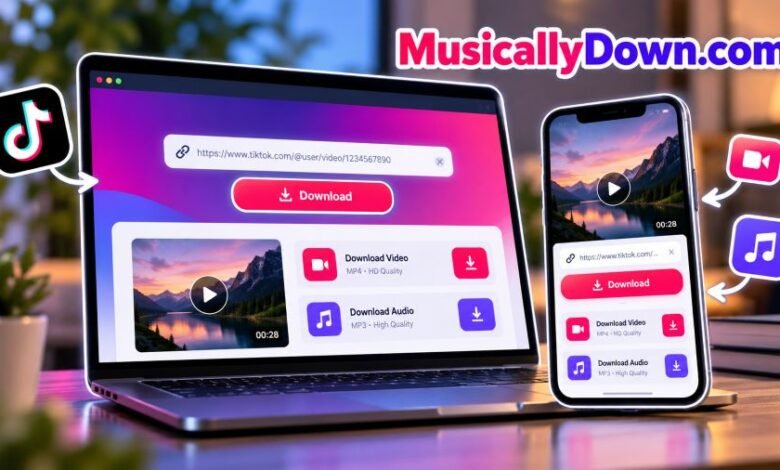
How Do You Download a Video?
The current accessible website describes a simple process.
- Open TikTok and find a public video you have permission to save.
- Tap or click the Share option.
- Select Copy Link.
- Open the downloader website.
- Paste the TikTok URL into the input box.
- Click Download.
- Choose an available file format and save it.
That is the advertised process.
The actual download may depend on the video, browser, and service availability.
For people using TikTok’s official app, there is another option.
TikTok offers a built-in Save Video feature when the creator permits downloads.
That can be the simpler choice.
Is the Service Free?
The accessible website says its downloader is free.
It advertises video and audio downloads without requiring a paid subscription.
The homepage also promotes unlimited downloading.
But these are operator claims. No independent performance test was completed to confirm unlimited usage under every condition.
The old domain had an advertising-based revenue model, according to WIPO’s historical findings.
The current alternative website also discusses advertising partners in its privacy policy.
Neither source establishes the service’s present earnings or profit.
Is It Safe to Use?
Safety deserves attention.
A downloader can look simple. But users still need to check the website they are visiting.
The original domain could not be assessed directly during this research. The accessible alternative has a published privacy policy, though that alone does not prove its security.
There are a few sensible precautions.
- Check the domain spelling before entering a link.
- Avoid unexpected pop-ups or redirects.
- Never give a downloader your TikTok password.
- Do not install unknown browser extensions or APK files.
- Check that the downloaded file is actually a video, audio file, or image.
- Keep your browser security features enabled.
Be especially careful with misleading download buttons.
A web page may contain advertisements that look similar to its actual controls.
What About Privacy?
The accessible website publishes a privacy policy.
It describes possible collection of technical information, including browser and device details.
It also discusses cookies and third-party advertising.
However, its statements are not fully consistent. One section says the website does not store user data, while another describes possible information collection. Its homepage also refers to download history associated with IP addresses.
Because of this, claims of complete anonymity should be treated carefully.
Users should avoid assuming that every visit or download is entirely private.
Can It Download Private Videos?
The accessible website says it cannot download videos from private TikTok accounts.
Its downloader is intended for publicly accessible links.
Private videos have viewing restrictions set by their creators.
Those restrictions should be respected.
A third-party website should not be trusted if it asks for someone else’s login credentials or promises to bypass private account protections.
Can You Legally Reuse Downloaded Content?
Saving a video and owning its copyright are different matters.
A creator generally keeps rights in their original work, subject to the rights of any other contributors and licensed material.
Removing a watermark changes the file’s appearance. It does not remove copyright protection.
For example, a business should not assume it can download another creator’s video and use it in an advertisement.
Permission may be required.
Some uses may fall under copyright exceptions, depending on the country and circumstances.
TikTok’s Intellectual Property Policy explains its approach to copyrighted material.
For regular users, a simple rule helps: save and reuse content only when you have the necessary rights or another valid legal basis.
What Are the Main Benefits and Limitations?
The service’s idea is easy to understand.
You provide a link. It attempts to return a downloadable file.
Here is a practical comparison based on the accessible website’s advertised features.
| Potential benefits | Limitations |
|---|---|
| Browser-based workflow | Requires accessible TikTok content |
| No registration advertised | Private videos unsupported |
| MP4 downloading | Video quality can vary |
| MP3 extraction | Music rights still apply |
| Mobile and desktop support | Browser problems may affect downloads |
| Free use advertised | Privacy claims remain unverified |
| Photo and Story tools | Feature availability may change |
The biggest point is reliability.
A website may advertise many features, but each download still depends on whether the service can retrieve the requested content.
Why Might a Download Fail?
A failed download does not always mean the website is broken.
There are several possible causes.
The video is private. The downloader may not have permission to access it.
The link is incorrect. An incomplete URL may not work.
The post was removed. Deleted content is usually unavailable.
The browser blocks something. Security settings or extensions can interfere with a website’s controls.
The service has a technical problem. Third-party tools may stop working when platforms change how content is delivered.
For problems involving the original MusicallyDown.com domain, its documented trademark dispute also matters.
Its current accessibility should not be assumed.
Frequently Asked Questions
1. What is MusicallyDown.com used for?
It was historically used to download TikTok videos without watermarks. Its original website offered a browser-based downloading service.
2. Is the original website working in 2026?
The exact MusicallyDown.com domain could not be accessed during research on October 9, 2026. A differently spelled domain, MusicalDown.com, was accessible.
3. Is it connected to TikTok?
The original domain was the subject of a successful ByteDance trademark complaint in 2021. The accessible alternative website states that it is not affiliated with TikTok or ByteDance.
4. Can you save TikTok videos without watermarks?
The accessible alternative website advertises this feature for supported public TikTok videos.
5. Can it download TikTok audio?
Yes. The accessible site advertises MP3 downloads from supported TikTok links.
6. Does it require a TikTok account?
The accessible service says users do not need a TikTok account to download supported public videos.
7. Does it work on iPhone and Android?
The accessible website advertises support for both platforms through compatible web browsers.
8. Who owns the original domain?
WIPO ordered MusicallyDown.com transferred to ByteDance on June 29, 2021. The decision does not, by itself, confirm the domain’s current registration details or the operator of MusicalDown.com.
Final Thought
MusicallyDown.com has an unusual history.
It started as a TikTok downloading website. Its name later became part of a trademark dispute with ByteDance.
That history is documented.
Meanwhile, a similarly named service remains accessible at a different web address and advertises many familiar downloading features.
The difference is easy to miss.
For anyone researching the website, checking the exact domain is the first thing to do. Users should also pay attention to privacy, copyright, and unexpected download prompts.
A simple tool can still raise important questions.
And knowing the facts makes those questions easier to answer.